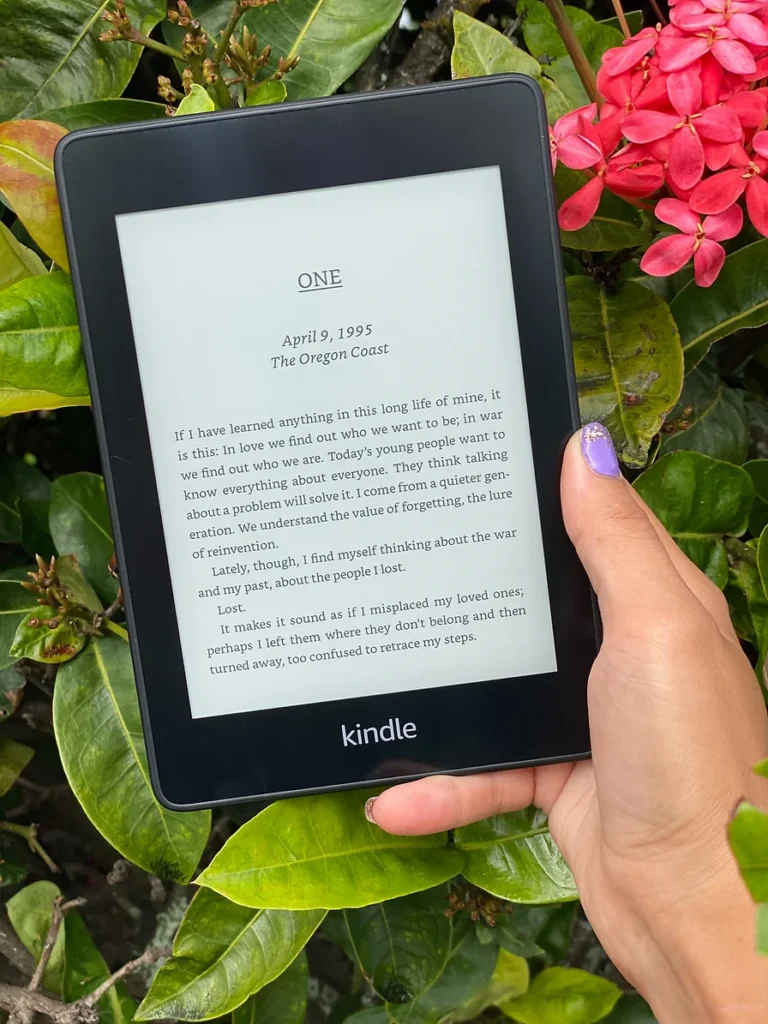

New Kindle Paperwhite vs Kobo Clara Colour: Which eReader is the best buy?
Have you been looking for Kindle Paperwhite alternatives and wondering about Kobo ereaders?
Kindle has undoubtedly dominated the ereader market for more than a decade, but they’re not the only viable option for readers. Kobo has grown in popularity worldwide, becoming the third highest leader in the ereader market share.
But with more ereaders to choose from, it’s easy to become overwhelmed and suffer from decision paralysis. I’m here to help. I’ve been using ereaders for years, dating back to the very first Kindle ereader. I decided to give Kobo a try in 2024, and since then I’ve been rigorously testing it as well as the newest Kindle Paperwhite, released in December, 2024.
In this post, I’ll give you an in-depth, honest, side-by-side comparison of the 12th generation Kindle Paperwhite (2024) with the Kobo Clara Colour 2e. I’ll break down the major differences and similarities and weigh in on which ereader does it better for each element as well as over all.
We’ll delve into the nitty-gritty details of each e-reader, comparing their design, features, compatibility, ethics, eco-friendliness, and overall reading experience. Whether you’re a Kindle devotee considering a switch or a newcomer to the e-reader scene, I’ll provide you with the information you need to make an informed decision.
So grab a cup of tea, settle into your favorite reading spot, and let’s embark on this e-reader adventure together!
A note on other Kindle ereaders: You might wonder why I am choosing to compare the Paperwhite to the Clara Colour rather than comparing the Colorsoft, Amazon’s foray into color e-ink. It seems a more obvious comparison, as one of the Clara Colour’s key features is color e-ink.
However, due to the astronomical pricetag on the Colorsoft as well as lots of legitimate complaints from early adopters, I think it’s wisest to steer clear of the Colorsoft, at least until future generations work out the kinks and lower the price.
In this review, I point out that I think the larger size in the newest Paperwhite model is actually a drawback rather than a selling point. Amazon did release a “pocket sized” Kindle, but as it isn’t waterproof, to me that also is not worth purchasing.

As always, this post may contain affiliate links, which means at no additional cost to you, shopping from them may generate small commissions to support the operations of this blog.
Whenever possible, I recommend buying books at local bookshops or through Bookshop.org, because shopping there puts the profits right into the hands of indie bookstores all over the country.
Key Takeaways:
- The Kobo Clara Colour 2e offers color e-ink for less than the price of the (grayscale) Kindle Paperwhite.
- The new Kindle Paperwhite is larger and heavier, which can make for awkward reading, but the upside is twice the battery life of the Kobo.
- Overall reading experience between the two is a toss-up, with each showing strengths in different aspects.
- In terms of company ethics and eco friendliness, Kobo is the clear winner.
Kobo Clara Colour vs. Kindle Paperwhite vs. Kindle Colorsoft Specs
Before we break it down into more detail, let’s take a quick look at the specs for each of these three ereaders in comparison with one another. While this post will focus on the Kobo Clara Colour and the 12th generation Paperwhite, I’ve included the Colorsoft in this table for easy reference, to highlight the differences.
| Feature | Kobo Clara Colour 2e | Kindle Paperwhite (12th gen) | Amazon Kindle Colorsoft |
| Display | 6″ | 7″ | 7″ |
| Resolution | 300 ppi B&W, 150 ppi color | 300 ppi | 300 ppi B&W, 150 ppi color |
| Color e-ink | Yes | No | Yes |
| Storage | 16GB | 16 GB | 32GB |
| Connectivity | Wi-Fi, Bluetooth, USB-C | Wi-Fi, Bluetooth, USB-C | Wi-Fi, Bluetooth, USB-C |
| Battery Life | Up to 42 days | Up to 84 days | Up to 56 days |
| Charging | USB-C | USB-C | USB-C, Wireless charging |
| Front Light | ComfortLight PRO (adjustable brightness and warmth), auto adjusting front light sensor | Adjustable brightness and warmth | Adjustable warm light, auto-adjusting front light sensor |
| Waterproof | IPX8 | IPX8 | IPX8 |
| Weight | 174g | 211 g | 219g |
| Dimensions | 112 x 160 x 9.2 mm | 127.6 x 176.7 x 7.8 mm | 127.6 x 176.7 x 7.8 mm |
| Supported Formats | EPUB, EPUB2, EPUB3, FlePub, PDF, MOBI, JPEG, GIF, PNG, BMP, TIFF, TXT, HTML, RTF, CBZ, CBR | AZW3, AZW, TXT, PDF, PRC natively; others via conversion | AZW3, AZW, TXT, PDF, unprotected MOBI, PRC natively; others through conversion |
| Audiobook Support | Yes, via Bluetooth | Yes (Audible, Bluetooth) | Yes (Audible, Bluetooth) |
| Highlight Colors | Yellow, pink, blue, green | Graytone | Yellow, orange, blue, pink |
| Library compatibility | Overdrive/Libby integration to browse and borrow on device | “Send to Kindle” from Libby app then wirelessly download on device | “Send to Kindle” from Libby app then wirelessly download on device |
| Other Features | Dark Mode, Pocket integration | Flush front design, 94 nits max brightness | |
| Sustainability | Made with 85% recycled plastic, including 10% oceanbound plastic | Made with 29% recycled materials, including 58% recycled plastic | Made from 28% recycled materials, including battery made from 100% recycled cobalt |
| Price | $139.99 | $159.99 with ads $179.99 without ads | $279.99 |
Related: If you want even more information, check out my detailed review of the Kobo Clara Colour 2e. I’ve also posted an in-depth review of the Kindle Paperwhite 10th generation as well as the latest, 12th generation Paperwhite.
Comparing the new Kindle Paperwhite to the Kobo Clara Colour 2e
Now that we’ve taken a look at the side-by-side specs of the Kindle vs. the Kobo, let’s take a more specific look at the new Kindle Paperwhite compared to the Kobo Clara Colour from a practical standpoint after several months of use.
As I stated previously, I think it’s wisest to forgo the Kindle Colorsoft for now, both because of the initial kinks early users have reported about the device, and because of the ridiculous price tag, when you can get color e-ink for significantly less with a Kobo.
I have used various iterations of the Kindle eReader for over a decade and have tested the newest 12th generation Kindle Paperwhite for several months now. The Kobo Clara Colour 2e is my first Kobo ereader, and I have been using it for about a year.
I paid for both of these ereaders (they were not gifted), and all opinions are my own honest assessment as an avid reader.
Overall design
Looking at the Kindle Paperwhite and the Kobo Clara Colour side-by-side, it’s obvious that these two ereaders are built quite differently. Yes, the newest Paperwhite is significantly larger, but we’ll get to that in the next section.
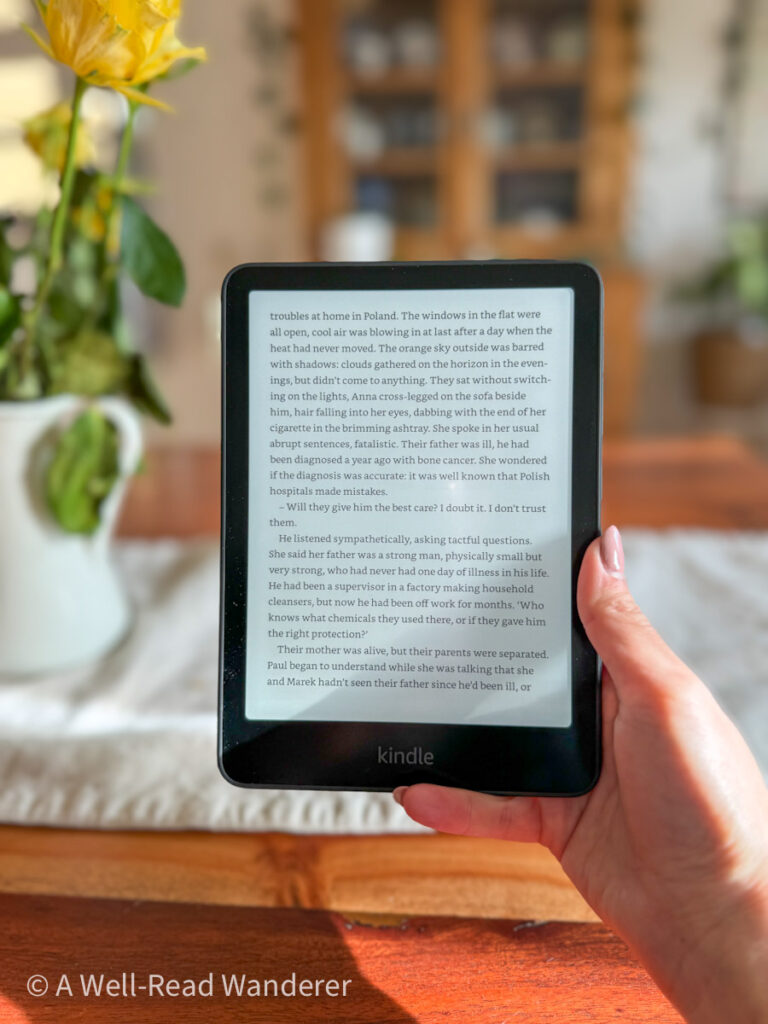
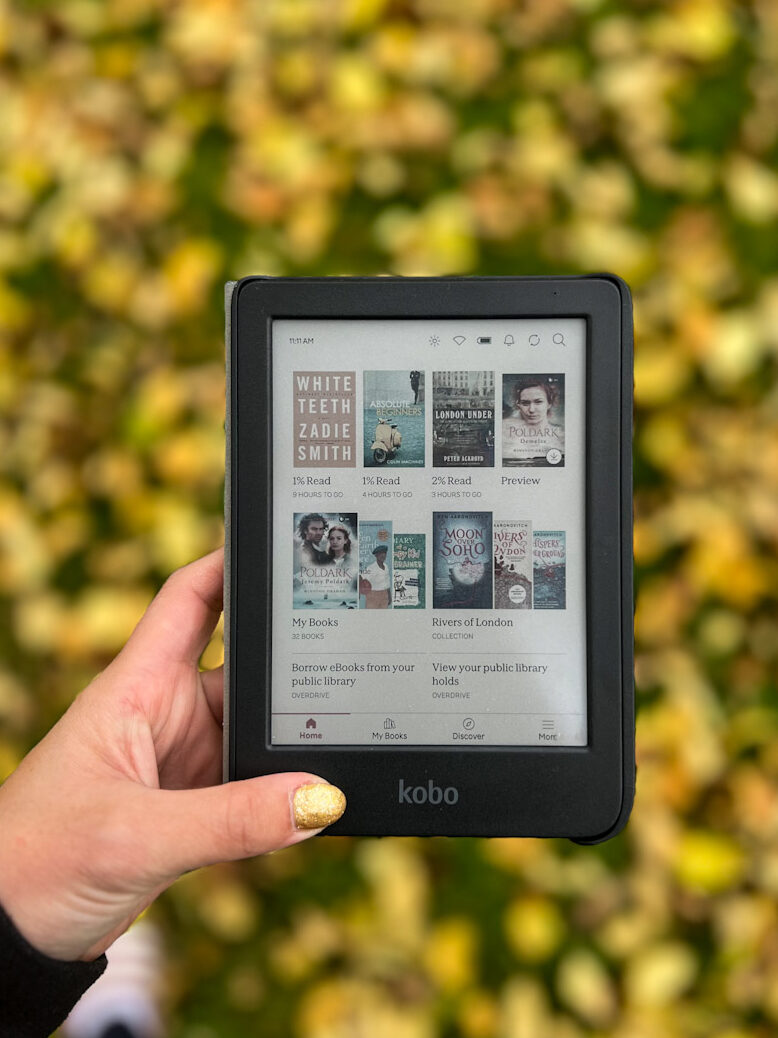
The Kindle Paperwhite has a flush front design, whereas the Kobo Clara Colour’s screen is sunken, with beveled edges (the Paperwhite used to have this type of model several generations ago).
The two ereaders also feel quite different. The Paperwhite has a matte design, whereas the Kobo has a more textured, plastic feel.
Winner: Kindle Paperwhite
Despite its propensity to harbor visible finger prints, the matte feel of the Paperwhite with the flush front design make it feel and look more high end than the more plastic feel and beveled screen edges of the Kobo Clara Colour 2e.
That said, if you use an ereader cover like most users (myself included), this difference isn’t so significant.
Size & Weight
The 12th generation Kindle Paperwhite is 1” larger than both previous generations of the Paperwhite and the latest generation of the Kobo Clara Colour — it’s now 7” compared to the 6” Kobo Clara Colour.
Along with the new size comes increased weight (both due to the size and the heavier duty battery) — 211g compared to the Kobo’s 174 g.
Winner: Kobo Clara Colour 2e
While this might seem like a small difference, I find the increased size and weight of the newest Paperwhite quickly becomes noticeable when reading with one hand (which is, after all, one of the benefits of using an ereader). I find that I only really like using the new Paperwhite when I can stand it up against something, whereas I don’t feel at all fatigued holding my Kobo for long periods.
Plus, the smaller Kobo fits more easily into my purse and is lighter and easier to carry with me when backpacking (I realize that’s not a consideration for everyone, but I know I’m not the only one out there for whom this is a factor).
So overall, in my opinion, bigger does not equal better when it comes to ereaders, and I’m quite happy with the 6” size.
Related: A new ereader always makes a great gift for book lovers.
User Interface
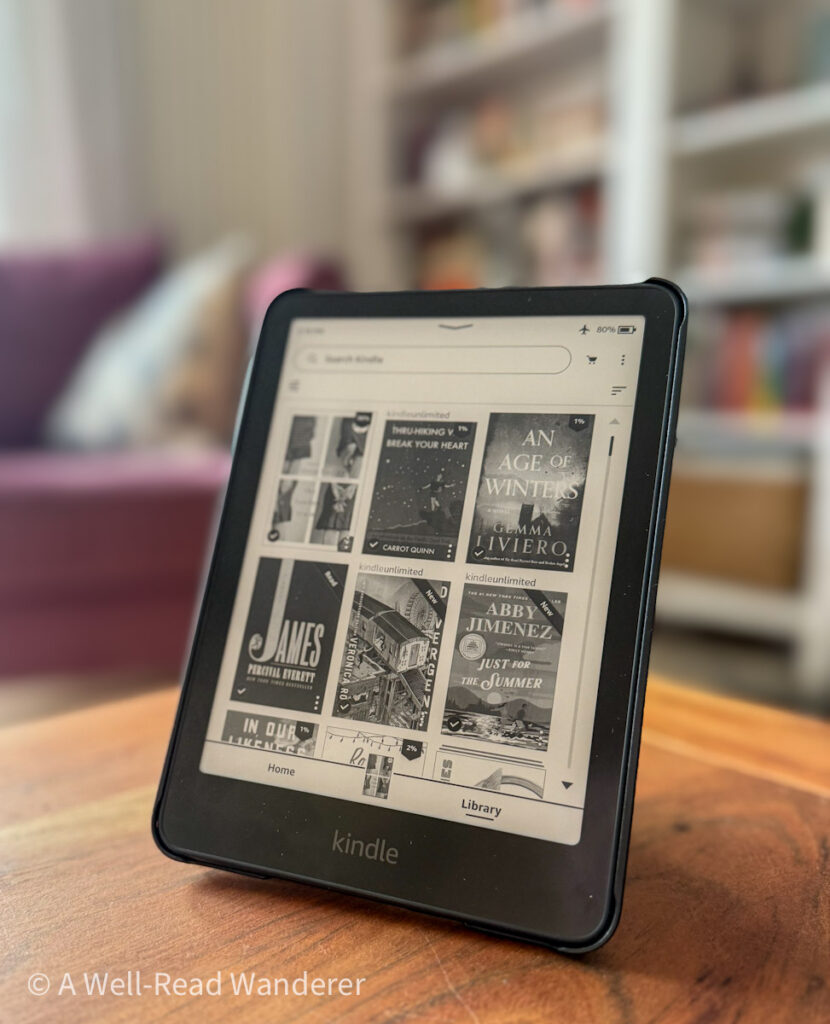
When you turn on a Kobo vs. a Paperwhite, there’s obvious differences in the user interfaces of the devices. Obviously the color covers on the Kobo stand out compared to the grayscale covers on the Kindle Paperwhite, but the differences go deeper than that and really affect functionality, too.

For one, on the Paperwhite, you may have ads on your sleep screen unless you pay extra to have them removed. If you do have ads enabled, there’s an extra swiping step to be able to wake your device up, which is a real pain.
Once the Paperwhite is on, you scroll through various horizontal galleries: From Your Library, followed by many automatically generated recommendation lists including several Kindle Unlimited categories (regardless of whether or not you subscribe).
You’re also likely to see several Kindle-related ads on your home screen when connected to WiFi, even if you have ads disabled – these try to get you to sign up for Kindle Unlimited, primarily.
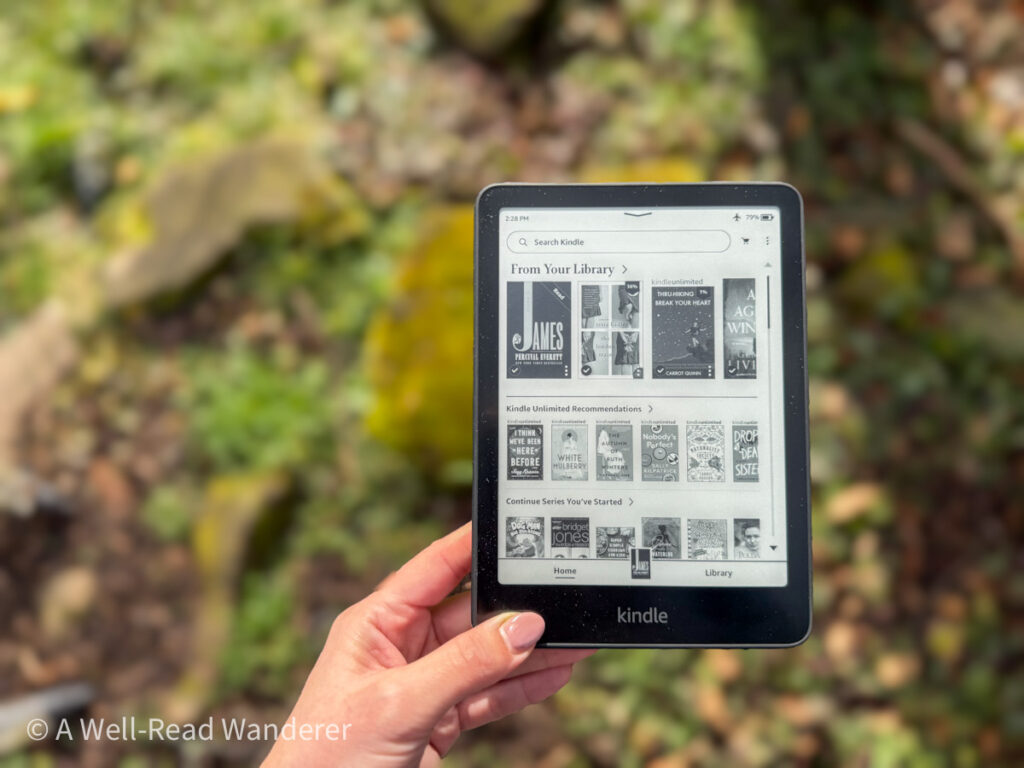
If you only want to see the books in your digital library, select “Library” rather than “Home,” at the bottom of the screen, and filter by books downloaded on your device.
At the top of the screen, you can search for Kindle books, which will direct you to the Kindle store.
The Kobo Clara Colour interface is quite different. After awakening the device from sleep, you’ll see most of the home screen is the color covers of the books in your library, with the most recently opened across the top, a quick preview of your library in the bottom left corner, and one of your custom collections pictured in the bottom right.
The bottom menu has three main options – Home (which is what I just described), My Books (where you can easily view your library with various logical sorting and filtering options, including by author, series, or your custom collections).
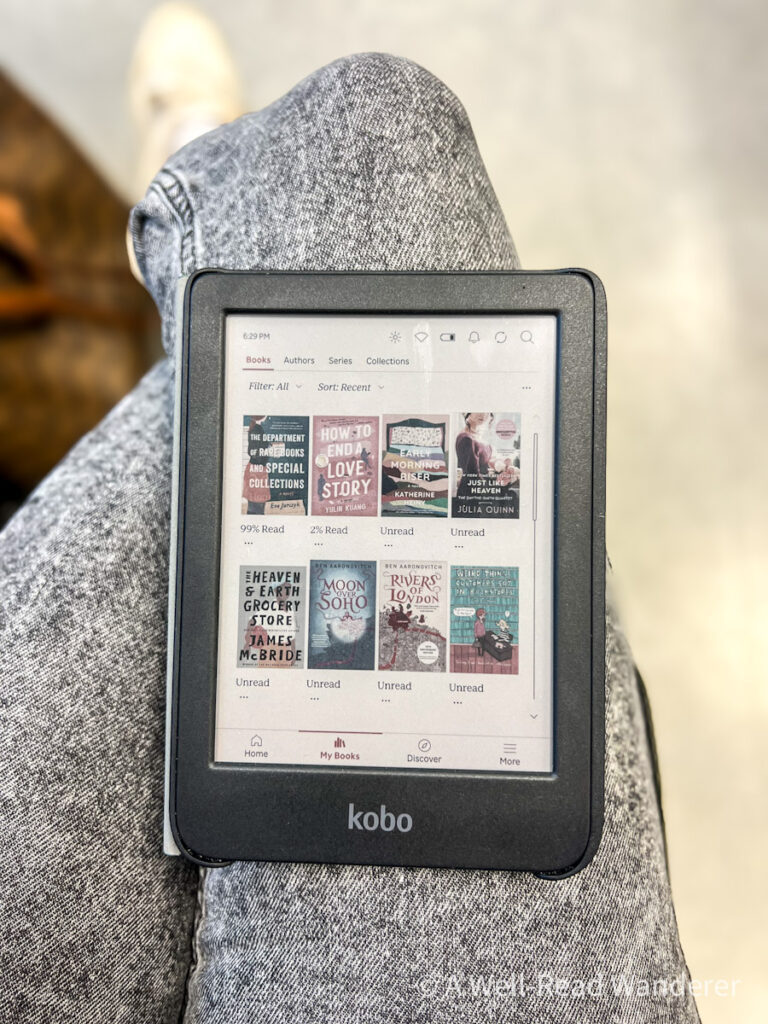
The next option is “Discover,” where you can view your wishlist, see the daily ebook deal, and browse recommended reads. This is also where you can easily browse books in Kobo Plus or books you can borrow from your library if you’ve set up Libby integration. In general, I find Kobo has a superior algorithm for book recommendations compared to Kindle.
Winner: Kobo Clara Colour 2e
This is an easy choice. The Kobo Clara Colour 2e has a more user-driven design, whereas Kindle’s is more geared toward upselling and trying to get you to spend more money on Amazon. While sales pages aren’t non-existent on Kobo, they seem more secondary to the user experience.
For example, when you search for a new book on Kobo, you’ll see not just the price to buy the book but also whether it’s available at your library (even though that means no sale for Rakuten), with the option to immediately borrow and download it.
Plus, the color covers and the more common sense customizable collections just make using the Kobo a much more enjoyable, simplified experience. The far superior operating system is one of the biggest elements in Kobo’s favor.

Reading Experience
As much as these other factors impact our experience of an ereader, what we all want them for is the actual reading experience. So, how does reading experience compare between the new Kindle Paperwhite and the Kobo Clara Colour?
There’s several factors to take into consideration:
Screen brightness and crispness
As much as I love my Kobo Clara Colour and don’t notice screen fuzziness when I’m reading, when taken side-by-side with the new Paperwhite, there’s an obvious difference in the screens. The newest Paperwhite has an incredibly bright, crisp screen, even when both ereaders are set to full brightness.
So for this element of the reading experience, I have to give it to the 12th generation Kindle Paperwhite.

Page turn speed
One of the most-touted new features of the latest Paperwhite is the faster page turns. I could tell immediately upon using it a huge difference in how fast the page turns were compared to my previous generation Kindle Paperwhite, but what about compared to the Kobo?
To test this, I put the devices side-by-side and turned the pages at the same time to visually compare. The Kindle Paperwhite did turn faster, but only by a fraction of a second (by comparison, the 10th generation Paperwhite was snail-paced level of laggy).
So, by a small margin, the Paperwhite wins this as well, though I wouldn’t place a lot of significance on it unless that’s a personal pet peeve.
Adjustable reading lights
This is related to crispness of the screen, but I consider it separately. The adjustable warmth of the built-in reading light was a newer feature on the Kindle Paperwhite (my 10th generation did no have it), but it’s on the Kobo Clara Colour as well.
I don’t play with the warmth adjustment much personally, so I’ve been satisfied with the warmth of lights on both the Paperwhite and the Kobo.
On both devices, you can set a schedule for when you want the warmth to change (for example, increasing warmth at 8 pm every day), but only the Kobo Clara Colour gives the option for auto-adjustment based on your surrounding environment.
I don’t personally like to use auto-adjusting lights period; I’m a controlling Virgo, so I like to set my brightness however I want, thank you very much, but we’ll give the Kobo Clara Colour the win here for having more options. For Kindle, auto adjusting warmth is only available on the more expensive Kindle Signature and Kindle Colorsoft.
On-Page Menus
This is another aspect of the reading experience that’s pretty different between the two ereaders – the on-page menu options when you are in the middle of reading a book.
Both the Paperwhite and the Kobo offer lots of customization options for your header and footer, such as having page number or percent read, or turning off the header and/or footer if you like a more minimalistic reading experience.
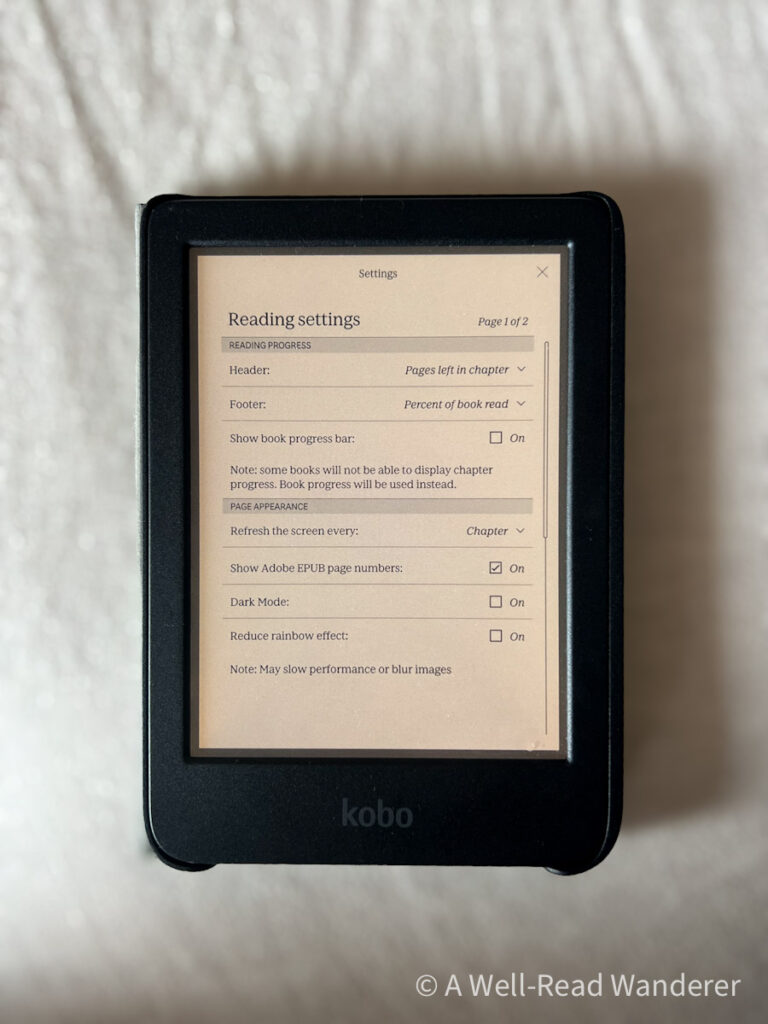
This category is difficult to judge because it relies so heavily on personal preference, but I’d give a slight edge to the Kobo Clara Colour, because I think it has more options for customizing the data shown on screen, and it gives more visual ways to display your progress through the book when you click on the image of the bar graph in the header menu.
Reading Experience Winner: It’s a toss-up
Both the Paperwhite 12th generation and the Kobo Clara Colour 2e have strong elements in their favor when it comes to reading experience, and different types of readers will weigh these elements differently.
So, I’m calling this one a toss up and providing you with the detailed information to decide for yourself which aspects of reading experience are most important to you.
Libby Integration
If you’re like me, you may primarily use your ereaders for ebooks borrowed from your libraries, so ease of integration can be an important factor when deciding on an ereader. Unfortunately, this is a complicated one to judge between the Kobo and the Kindle Paperwhite.
On the one hand, Kobo integrates Libby into their ereaders so you can search for and borrow books directly from your device. It makes it so easy when browsing to see if a book you want is available from your library right in the same screen as you the cost to purchase it.
That makes it a much more seamless browsing and borrowing experience compared to reading Libby books on your Kindle, which involves borrowing the book on the Libby app or internet browser, selecting “read with Kindle,” then sending it to your chosen Kindle device to download when you connect to Wi-Fi and sync.
I love the Kobo Libby integration overall, but it does come with a couple of drawbacks. For one, it gets very glitchy when you try to link it to more than one library.
Avid Libby users like me usually have multiple library cards from various libraries linked to their accounts, but to use it on your Kobo Clara Colour, you essentially have to pick one and stick to it. Once you switch to another library, your loans from other libraries disappear from your device. This can be a major deterrent for some readers.
My other annoyance with Kobo Libby integration is the automatic returns. On my Kindle, I download my library books and put the device into airplane mode so I can continue reading my ebooks after their return date (though as far a the library is concerned, the books are returned on their due date and go to the next user).
On the Kobo, even if you’re in airplane mode, borrowed books automatically return on the date they are due.
Winner: It’s a toss-up
The Kobo/Libby integration is a great feature, but the quirks of using it in practice might make it more frustrating than useful for some types of Libby users.
eBook Platform
Let’s talk about how we use and access ebooks on each of these devices. eBook prices seem to be pretty similar between the two platforms, and both offer a rewards program to incentivize purchasing through their stores.
They both also offer daily and monthly ebook deals. I’ve been tracking these for several months, and they seem pretty comparable, often offering many of the same books on sale on any given month or day.
Monthly subscriptions
Kindle Unlimited is one of the top features for many Kindle users. For $11.99/month, you can borrow up to 20 titles at a time from their library of 4 million books, audiobooks, and magazines.
Kobo’s answer to this is Kobo Plus. You can choose from either the Read + Listen membership for $9.99/month, or just Kobo Plus Read (without audiobooks) for $7.99/month. Their library currently contains over 1.5 million ebooks and 150,000 audiobooks — a significantly smaller library size than KU. Howevern, unlike Kindle Unlimited, there is no limit to how many you can borrow at any one time.
Notably, one of the reasons many people end up sticking with Kindle Unlimited is their exclusivity requirement for self-published authors — basically, authors who self-publish to Kindle Unlimited cannot sell their books on any other platform.
Kobo does not require exclusivity of their authors. This leaves self-published authors with a difficult choice to make – sell on the bigger platform but perpetuate the problem, keeping more people bound to Amazon, or go with Kobo, which allows more freedom but currently fewer subscribers?
Readers must make a similar choice, and it’s one I can’t make for you.
eBook file types allowed
Kobos are compatible with EPUB, EPUB2, EPUB3, PDF, and MOBI. Their native books are sold in KEPUB, a modified EPUB version. Many users recommend that if you purchase an EPUB from another source, it will work best with your Kobo to convert it to KEPUB first using a program like Calibre. I can’t personally confirm the effectiveness of this, having not done it myself.
Kindles are compatible with their native formats, EPUB, PDF, and .doc/x. Notably, they are no longer compatible with MOBI, so if you have a MOBI ebook, you’ll need to convert it to an epub using Calibre or a similar program. To view some supported format books on your Paperwhite, you’ll have to use the wireless “send to my kindle” function.
Related: Have you been wondering if Audible is worth it ? Read my detailed and honest breakdown, updated for their 2025 changes. Plus, see my 50 top picks for audiobooks included in the Audible Plus catalog.
Cross-platform Compatibility
As of February, 2025, Kindle no longer allows users to download and transfer their ebooks via USB. While likely only a small percentage of Kindle users ever used this ability, those that did use it are pretty angry with the disappearance of this feature.
Formerly, some Kindle users would download their Kindle ebook purchases as back-up or to convert them to other formats (like EPUB) that are compatible with non-Kindle ereaders. This is no longer an option.
Recently, one of my favorite Amazon alternative online bookstores — Bookshop.org — started selling ebooks. The benefit of purchasing ebooks through Bookshop.org is that purchases support independent bookstores rather than the massive Amazon conglomerate.
At the time of writing, you can only read Bookshop.org ebooks in their app, but their website states:
“We are working with Kobo to support Kobo devices later this year” (2025).
There is no such partnership in the works for Kindle. That is a huge win for Kobo and something I look forward to seeing later this year.
Winner: It’s a toss-up
If you’re someone who primarily reads books on Kindle Unlimited, then Kobo Plus, while it’s growing quickly, really cannot compete, at least in part “thanks” to Kindle’s exclusivity requirements for their authors.
However, the upcoming compatibility with Kobos and Bookshop.org ebooks makes Kobo a very attractive alternative with cross-platform use, particularly with Kindle recently removing the download and transfer option that allowed owners to convert their files for other ereaders.

Eco Friendliness
Since 2022, all Kobo e-readers have been made with at least 85% recycled plastic, including at least 10% ocean-bound plastic. They proudly help divert CDs, plastic bottles, and other waste away from oceans and landfills.
Additionally, the Kobo Clara Colour is repairable, so if your e-reader starts acting up down the line, you can have it repaired rather than purchase an entirely new device.
When you are ready to bid your Kobo ereader goodbye, you can mail in your ereader free of charge from the US or Canada, and a government certified e-waste recycling company will handle proper disposal.
By contrast, the new Kindle Paperwhite 12th generation is made from 29% recycled materials, though the internal structure is made of 90% recycled magnesium. The plastic is made from 58% recycled plastic.
Kindle Paperwhites are not made to be repaired, but they do offer a trade-in program when you’re finished with your device. Traded in products will be refurbished for resale or recycled (no further details given).
Winner: Kobo Clara Colour 2e
The Kobo Clara Colour 2e is the more eco-friendly reader, due to its higher ratio of recycled content, its repairable design, and its certified recycling option when your device has reached the end of its life.
Do you enjoy reading books set in different countries? I’ve designed a custom Read Around the World Journal specifically for readers who want to explore more world literature and track their progress. Make lists, color in bookshelves, and play Read Around the World Bingo in this unique reading tracker.
You can take a peek inside the journal, peruse my list of resources to help you on your reading journey, and order a copy if you think it’s the right fit for you!
Battery Life
Let’s take a look at the battery life of these two ereaders.
Kindle Paperwhite advertises up to 12 weeks of battery life based on a half hour of reading per day with wireless off and light at 13.
The Kobo Clara Colour advertises up to 6 weeks of battery life based on 30 minutes of daily reading with 30% brightness and WiFi/Bluetooth off.
So at similar usage, the new Kindle Paperwhite’s battery can last up to twice as long as the Kobo Clara Colour.
Winner: Kindle Paperwhite 12th generation
With a caveat: I will say that I have not at all been dissatisfied with the battery life on my Kobo, and the tradeoff of a bigger battery is the increased weight of the Paperwhite.
Pricing and Value
Price is obviously a major factor in most purchasing decisions, so let’s take a look at the prices of the Kobo vs. Kindle and the value you get for each.
The Kobo Clara Colour is sold for $139.99 USD. The 12th generation Kindle Paperwhite is sold for $159.99 with ads enabled or $179.99 without ads.
That is a $40 difference between the ad-free Kobo and the ad-free Paperwhite. The Kindle Colorsoft, which is $279.99, is a full $140 more than the Kobo Clara Colour, literally twice the price.
Winner: Kobo Clara Colour 2e
Given that Amazon is charging customers more than $100 more to get color e-ink, and you can get a color e-ink reader from Kobo for cheaper than the cost of the standard Kindle Paperwhite, the Clara Colour is the clear winner here.
Plus, Kobo doesn’t have an upcharge to remove ads from your device. It’s obvious that the Kobo Clara Colour is not only a lower price but a better value e-reader.
Company Ethics
The fact that Amazon still avoids paying taxes in the US is a big deal for many consumers, plus the repeated reports of them engaging in some unsafe labor practices, is leading many people away from Amazon and looking for viable alternatives.
Both are large corporations — Rakuten has even been called the “Amazon of Japan,” but Rakuten does consistently receive better company ethics scores from third parties.
Shop ethical! Is a small, non-profit organization in Australia that works to educate consumers on the companies from which they purchase. They give Rakuten a rating of B (some praise, no criticism), whereas Amazon receives an F.
Ethical Consumer is another non-profit cooperative that gives companies ethical ratings. While their detailed ratings are behind a paywall, they said in a December 2024 article: “For [Kindle alternatives], we found the Kobo e-reader, which was middling in our ethical rating system – compared to Amazon, which scored a shocking 0 out of 100.”
Winner: Rakuten Kobo Clara Colour 2e
While Rakuten is not a perfect company, a look at the independent data on the ethics of the two companies makes Rakuten the clear winner.

Verdict: Kindle Paperwhite vs. Kobo Clara Colour
Let’s do a quick review of the winners for each category in this detailed review.
| Kobo Clara Colour 2e | Kindle Paperwhite (12th gen) | |
| Overall design | ✓ | |
| Size and weight | ✓ | |
| User interface | ✓ | |
| Reading experience | ≅ | ≅ |
| Libby integration | ≅ | ≅ |
| eBook platform | ≅ | ≅ |
| Eco friendliness | ✓ | |
| Battery life | ✓ | |
| Pricing & value | ✓ | |
| Company ethics | ✓ | |
| Overall winner | ✓ |
It’s difficult to declare one universal winner because of how much personal preference comes in to play. The features that are most important to me as a reader are not necessarily the most important features to you. For example, while I dislike the increased size and weight of the Paperwhite, you may prefer the larger screen.
Hopefully I’ve given enough detailed information in each of the elements of these two e-readers to help you make an informed decision on which is the right choice for you.
As for me, in general I venture to say that the Kobo Clara Colour 2e is the overall winner over the 12th generation Kindle Paperwhite. It may not be quite as crisp, and you may need to live without Kindle Unlimited (easily done for me), but it’s a great value, more user friendly, and with tried and true color e-ink.
Plus, if you believe in purchasing based on company values, Rakuten stands head and shoulders above Amazon in terms of company ethics and sustainability.
Hopefully this detailed analysis has helped you decide which ereader is right for you — the new Kindle Paperwhite or the Kobo Clara Colour 2e.
Don’t forget to pin this post for later, and subscribe to my monthly newsletter so you never miss out on any bookish content.